Skip to content
  • Categories
  • Recent
  • Tags
  • Popular
  • Users
  • Groups
Skins
  • Light
  • Brite
  • Cerulean
  • Cosmo
  • Flatly
  • Journal
  • Litera
  • Lumen
  • Lux
  • Materia
  • Minty
  • Morph
  • Pulse
  • Sandstone
  • Simplex
  • Sketchy
  • Spacelab
  • United
  • Yeti
  • Zephyr
  • Dark
  • Cyborg
  • Darkly
  • Quartz
  • Slate
  • Solar
  • Superhero
  • Vapor

  • Default (No Skin)
  • No Skin
Collapse

MTool Forum

  1. Home
  2. Error Report
  3. 淫魔術戯-外伝-

淫魔術戯-外伝-

Scheduled Pinned Locked Moved Error Report
9 Posts 3 Posters 16 Views 3 Watching
  • Oldest to Newest
  • Newest to Oldest
  • Most Votes
Reply
  • Reply as topic
Log in to reply
This topic has been deleted. Only users with topic management privileges can see it.
  • M Offline
    M Offline
    MTool_ErrorReport
    wrote on last edited by
    #1

    Error Report: https://err.mtool.app/view.php?reportId=e49fd3845083580bc7d3a778f50d6053

    === 错误报告信息 / Error Report Information ===

    【用户信息 / User Information】
    用户ID / User ID:
    580974830

    【用户输入信息 / User Input Information】
    游戏名称 / Game Name:
    淫魔術戯-外伝-
    游戏网址 / Game URL:
    https://www.dlsite.com/maniax/work/=/product_id/RJ01582983.html/
    问题描述 / Issue Description:
    在最新版本中,VX ACE游戏运行两次及以上时就会发生崩溃。
    具体来说,启动Windows后,用MTOOL运行VX ACE游戏,关闭游戏后再试图用MTOOL重新启动它时,就会发生崩溃。
    在稳定版中,虽然会弹出“DLL WRAP”的提示信息,但游戏还能正常运行。而这次情况不同,是必定会无条件直接闪退(关闭)的崩溃。
    目前的文件夹名称是英文的,不清楚如果改成其他语言的文件夹名称是否还会出现同样的症状。
    这个问题似乎在当前MTOOL的最新版本中,所有使用VX ACE引擎的游戏上都会发生。
    为了便于理解,这段话是使用翻译软件生成的。

    【系统状态 / System State】
    平台 / Platform:
    PC
    代码页 / Code Page:
    949
    游戏运行状态 / Game Running Status:
    未运行 / Not Running
    当前标签页 / Current Tab:
    공지
    工具版本 / Tool Version:
    5522A724

    【翻译信息 / Translation Information】
    非中/日/韩模式 / Non-CJK Mode:
    关闭 / Disabled
    【硬件信息 / Hardware Information】
    操作系统 / Operating System:
    Windows_NT 10.0.19045 (x64)
    处理器 / Processor:
    AMD Ryzen 7 5700X3D 8-Core Processor
    CPU线程数 / CPU Threads:
    16
    内存 / Memory:
    32GB 总计 / Total, 18GB 可用 / Available
    显卡 / Graphics Card:
    ANGLE (NVIDIA, NVIDIA GeForce RTX 3080 Direct3D11 vs_5_0 ps_5_0, D3D11)
    WebGL支持 / WebGL Support:
    正常 / Normal
    屏幕缩放比例 / Screen Scale Ratio:
    1.25

    【工具设置 / Tool Settings】
    字体设置 / Font Setting:
    GyeonggiTitle Medium
    字体可用性 / Font Availability:
    可用 / Available
    防病毒规避 / Antivirus Evasion:
    开启 / Enabled
    工具版本频道 / Tool Version Channel:
    trs

    1 Reply Last reply
    • 鬼 Offline
      鬼 Offline
      鬼才琪露诺
      wrote on last edited by
      #2

      我需要一个关于这个错误的截图, 我的意思是在稳定版出错的截图. 因为目前我这边没办法复现这种问题. 我需要一个入手点.
      I need a screenshot of this error—specifically, a screenshot showing the error occurring in the stable version.
      At the moment, I’m unable to reproduce this issue on my side.
      I need a starting point.

      L 1 Reply Last reply
      • 鬼 鬼才琪露诺

        我需要一个关于这个错误的截图, 我的意思是在稳定版出错的截图. 因为目前我这边没办法复现这种问题. 我需要一个入手点.
        I need a screenshot of this error—specifically, a screenshot showing the error occurring in the stable version.
        At the moment, I’m unable to reproduce this issue on my side.
        I need a starting point.

        L Offline
        L Offline
        leus
        wrote on last edited by leus
        #3

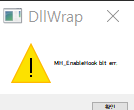
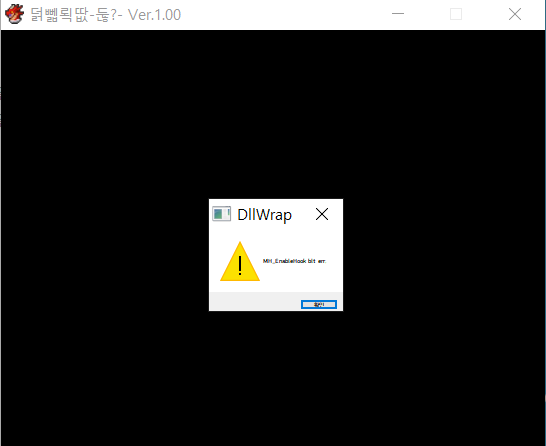
        @鬼才琪露诺 1a470334-b3f2-4bde-b2b1-a169c30f13f2-image.png 071ff966-3ae1-44bb-9103-b337e7acb9b8-image.png

        I'm not sure if this will help with your issue, but these DLL WRAP errors occur in the stable version. Are there any additional requirements?

        鬼 1 Reply Last reply
        • L leus

          @鬼才琪露诺 1a470334-b3f2-4bde-b2b1-a169c30f13f2-image.png 071ff966-3ae1-44bb-9103-b337e7acb9b8-image.png

          I'm not sure if this will help with your issue, but these DLL WRAP errors occur in the stable version. Are there any additional requirements?

          鬼 Offline
          鬼 Offline
          鬼才琪露诺
          wrote on last edited by
          #4

          @leus https://discord.gg/mtool
          Come here. I need to remotely access your computer to see what exactly is going on. What you’re describing is basically “something that shouldn’t be possible,” and no one else has reported this issue.

          L 2 Replies Last reply
          • 鬼 鬼才琪露诺

            @leus https://discord.gg/mtool
            Come here. I need to remotely access your computer to see what exactly is going on. What you’re describing is basically “something that shouldn’t be possible,” and no one else has reported this issue.

            L Offline
            L Offline
            leus
            wrote on last edited by
            #5

            @鬼才琪露诺 I sent a direct message—should I try a different approach?

            1 Reply Last reply
            • 鬼 鬼才琪露诺

              @leus https://discord.gg/mtool
              Come here. I need to remotely access your computer to see what exactly is going on. What you’re describing is basically “something that shouldn’t be possible,” and no one else has reported this issue.

              L Offline
              L Offline
              leus
              wrote on last edited by
              #6

              @鬼才琪露诺 Thank you for your continued interest in this issue. Unfortunately, even after completely removing IMAGE SAFER, the success rate remains low, at approximately 3 out of 10 launches.
              It seems there might be some kernel-level residuals or registry leftovers from IMAGE SAFER. The fact that it only succeeds sporadically suggests a potential hooking conflict or a race condition that leads to system instability. For reference, I currently have several programs with overlay or monitoring features, such as NVIDIA, Steam, Kaspersky, and Discord, though I'm not certain if they are directly contributing to the issue.
              I’ve also noticed occasional crashes in MV/MZ right at startup, although they are much more stable, succeeding about 9 out of 10 times. Since I haven't seen similar reports from other users, this might be an issue unique to my specific environment. I just wanted to provide this information for your reference.
              鬼 1 Reply Last reply
              • L leus

                @鬼才琪露诺 Thank you for your continued interest in this issue. Unfortunately, even after completely removing IMAGE SAFER, the success rate remains low, at approximately 3 out of 10 launches.
                It seems there might be some kernel-level residuals or registry leftovers from IMAGE SAFER. The fact that it only succeeds sporadically suggests a potential hooking conflict or a race condition that leads to system instability. For reference, I currently have several programs with overlay or monitoring features, such as NVIDIA, Steam, Kaspersky, and Discord, though I'm not certain if they are directly contributing to the issue.
                I’ve also noticed occasional crashes in MV/MZ right at startup, although they are much more stable, succeeding about 9 out of 10 times. Since I haven't seen similar reports from other users, this might be an issue unique to my specific environment. I just wanted to provide this information for your reference.

                鬼 Offline
                鬼 Offline
                鬼才琪露诺
                wrote last edited by
                #7

                @leus Based on your description, there must be other issues as well...

                The impact of IMAGE SAFER should already have been resolved.

                Your environment may be worth a more “in-depth” inspection.

                1 Reply Last reply
                • L Offline
                  L Offline
                  leus
                  wrote last edited by
                  #8

                  I’ve tried various approaches, but I’ve come to realize that I simply can’t resolve this conflict in the latest version. Could you help me?

                  1 Reply Last reply
                  • 鬼 Offline
                    鬼 Offline
                    鬼才琪露诺
                    wrote last edited by
                    #9

                    In that case, this must be a separate issue unrelated to IMAGE SAFER.
                    I suggest you try running the game in a virtual machine.

                    1 Reply Last reply
                    Reply
                    • Reply as topic
                    Log in to reply
                    • Oldest to Newest
                    • Newest to Oldest
                    • Most Votes


                    • Login

                    • Login or register to search.
                    • First post
                      Last post
                    0
                    • Categories
                    • Recent
                    • Tags
                    • Popular
                    • Users
                    • Groups